%20scale(1.25)'%20fill='none'%20stroke='hsl(224%2064%25%2033%25)'%20stroke-width='1.8'%20stroke-linecap='round'%20stroke-linejoin='round'%3e%3cpath%20d='M9%204H5v16h4M15%204h4v16h-4'/%3e%3ccircle%20cx='12'%20cy='12'%20r='2.5'%20fill='hsl(224%2064%25%2033%25)'%20stroke='none'/%3e%3c/g%3e%3cg%20transform='translate(40%2028.5)%20scale(0.024%20-0.024)'%20fill='hsl(224%2040%25%2012%25)'%3e%3cpath%20transform='translate(0)'%20d='M79%200V710H213V371L152%20415H567L506%20371V710H640V0H506V343L567%20299H152L213%20343V0Z'/%3e%3cpath%20transform='translate(664)'%20d='M108%20-150V-48H177Q203%20-48%20215.5%20-40.5Q228%20-33%20235%20-14L249%2022H211L21%20534H158L290%20146L415%20534H552L344%20-55Q326%20-106%20293%20-128Q260%20-150%20201%20-150Z'/%3e%3cpath%20transform='translate(1170)'%20d='M69%20-150V534H196L199%20421L187%20426Q207%20485%20252.5%20515.5Q298%20546%20358%20546Q434%20546%20484.5%20508.5Q535%20471%20560%20408Q585%20345%20585%20267Q585%20190%20559.5%20126.5Q534%2063%20483.5%2025.5Q433%20-12%20357%20-12Q318%20-12%20283.5%202Q249%2016%20224.5%2042Q200%2068%20189%20104L202%20113V-150ZM325%2094Q382%2094%20415%20140Q448%20186%20448%20267Q448%20348%20415%20394Q382%20440%20325%20440Q287%20440%20259.5%20421Q232%20402%20217%20363Q202%20324%20202%20267Q202%20210%20216.5%20171.5Q231%20133%20259%20113.5Q287%2094%20325%2094Z'/%3e%3cpath%20transform='translate(1739)'%20d='M303%20-12Q224%20-12%20164%2022.5Q104%2057%2071.5%20120Q39%20183%2039%20267Q39%20352%2071.5%20414.5Q104%20477%20164%20511.5Q224%20546%20303%20546Q383%20546%20442.5%20511.5Q502%20477%20534.5%20414.5Q567%20352%20567%20267Q567%20183%20534.5%20120Q502%2057%20442.5%2022.5Q383%20-12%20303%20-12ZM303%2094Q364%2094%20397%20139.5Q430%20185%20430%20267Q430%20349%20397%20394.5Q364%20440%20303%20440Q243%20440%20209.5%20394.5Q176%20349%20176%20267Q176%20185%20209.5%20139.5Q243%2094%20303%2094Z'/%3e%3cpath%20transform='translate(2273)'%20d='M285%200Q204%200%20166.5%2037Q129%2074%20129%20154V660H261V168Q261%20130%20277%20116Q293%20102%20327%20102H402V0ZM44%20433V534H402V433Z'/%3e%3cpath%20transform='translate(2647)'%20d='M69%200V534H202V0ZM67%20605V719H204V605Z'/%3e%3cpath%20transform='translate(2863)'%20d='M50%200V109L356%20433H62V534H513V426L203%20102H520V0Z'/%3e%3cpath%20transform='translate(3358)'%20d='M302%20-12Q222%20-12%20162.5%2022.5Q103%2057%2071%20120Q39%20183%2039%20267Q39%20352%2071%20414.5Q103%20477%20162%20511.5Q221%20546%20300%20546Q377%20546%20434.5%20512Q492%20478%20523.5%20413.5Q555%20349%20555%20260V231H176Q180%20161%20213.5%20127Q247%2093%20304%2093Q346%2093%20373.5%20111.5Q401%20130%20412%20164L547%20156Q526%2078%20460.5%2033Q395%20-12%20302%20-12ZM176%20318H418Q414%20382%20382%20413Q350%20444%20300%20444Q249%20444%20216%20411.5Q183%20379%20176%20318Z'/%3e%3c/g%3e%3c/svg%3e)
In brief
Which one fits your team
When Hypotize fits
Choose Hypotize when coordination becomes the pain: several owners, tests nobody closed, and the reasoning behind each decision. Invite the team with a link, let everyone vote for free in ICE, PIE, or RICE, and work in views made for experiments. Tests cannot reach Ready without a hypothesis, a success metric, a segment, and dates, or close without a result and a learning, and your agent reads every learning before it proposes the next test. A team of 3 pays $39/month.
When Google Sheets or Excel fits
Stay on Google Sheets or Excel if one person owns the record, the team runs a few tests a year, and a consistent row already captures the hypothesis, result, evidence, and learning. Nothing is faster to start, and nothing beats it for analysis on raw numbers.
Microsoft: overview of Excel tablesGoogle Sheets: dropdownsRunning tests in an A/B testing tool? It measures, Hypotize remembers. How the two work together
Built for AI agents first
The agent-native Growth OS
Your AI agent works in Hypotize through MCP, with skills that teach it the method, and the server holds it to the same rules as your team. What the Growth OS is made of
What Google Sheets or Excel documents
Google runs an official Sheets MCP server, in developer preview, that lets an agent read and write cells, formulas, and rows with the user's own permissions. Excel workbooks in OneDrive or SharePoint are reachable through the Microsoft Graph Excel API, and Gemini and Copilot work inside the file. The difference is what the agent finds there. In a sheet it finds the columns you designed and can write any value in any cell. In Hypotize it finds a fixed experiment record, and the server refuses a stage it skips or a test it closes without a result.
Google: configure the Sheets MCP serverMicrosoft Graph: working with ExcelYou
The checkout test has run its two weeks. Close it.
Your AI agent
hypotize_experiment_transition
Hypotize refused to close it: a test needs a measured result and a written learning first. I'm pulling the numbers from your analytics.
Your AI agent
your analytics connector
Control converted at 3.1%, the one-page checkout at 3.8%, over 14 days and about 12,000 sessions per variant. A two-proportion test gives p ≈ 0.003, under your 0.05 threshold.
Your AI agent
hypotize_experiment_record_outcome
Recorded the result, the evidence, and the learning, then closed the test as a win. Next time anyone on the team asks about checkout, this result comes back with its numbers.
What the other product is
A real alternative with a different emphasis
Google Sheets and Excel are general-purpose spreadsheets: rows, columns, formulas, filters, and charts. An experiment tracker in either is a sheet your team designs, usually one row per test with a status, an owner, a score, and result columns.
They are the default for almost every team: Google Sheets where the company runs on Google Workspace, Excel where it runs on Microsoft 365, and both free with a personal account.
In our research of public threads, spreadsheets are the experiment tracker growth teams mention most. Hypotize does not replace your spreadsheets. It takes over the experiment record, and your team can keep analysing the numbers in Sheets or Excel.
Google: configure the Sheets MCP serverGoogle: Gemini in SheetsGoogle Sheets: dropdownsGoogle Drive: share filesGoogle Workspace pricingMicrosoft: overview of Excel tablesMicrosoft: apply data validation to cellsMicrosoft: Excel co-authoringMicrosoft Graph: working with ExcelMicrosoft: Copilot in ExcelMicrosoft 365 for the webWhat teams say
Where the spreadsheet breaks, in practitioners' words
Growth practitioners describing their own trackers in a public r/GrowthHacking thread, March 2026. Quoted as written and linked to the comment.
“It stops being just a spreadsheet when coordination becomes the pain, not tracking. That's usually when you have 10 plus experiments live, multiple owners or client accounts, and you're doing weekly manual copy paste from different tools.”
“hypothesis, expected lift, confounding factors at the time, what you decided and why -- that stuff evaporates when the sheet changes.”
“When experiment B needs to wait for learnings from experiment A, and you're managing 5+ of those chains simultaneously, spreadsheets become a liability.”
“the spreadsheet broke the second I started heavily scaling ad creative tests.”
Volume alone rarely breaks the sheet. Coordination does: owners, dependent tests, tests nobody closed, and the reasoning behind each decision. Hypotize enforces those parts of the record, and your agent keeps it current.
Side by side
Where each one is stronger
Rows about working with an AI agent come first, because that is what Hypotize is built for. Every Google Sheets or Excel cell comes from its official pages, reviewed on 22 October 2026 and linked in place. Each row names the stronger side for that criterion, in our judgment, and the line under each Google Sheets or Excel cell says where the claim comes from.
Working with an AI agent
Your AI agent works in the record
Stronger: Hypotize- Hypotize
- Yes, through MCP. Claude, ChatGPT, Grok Bot, Cursor, Codex, and other MCP clients read the backlog and the learnings and update the record.
- Google Sheets or Excel
- Google Sheets: Google's Sheets MCP server, in developer preview, lets MCP clients read and write cells, formulas, and rows with the user's own permissions. Excel: apps reach workbooks in OneDrive or SharePoint through the Microsoft Graph Excel API; we found no Microsoft MCP server for Excel.From their docsGoogle: configure the Sheets MCP serverMicrosoft Graph: working with Excel
Rules the agent cannot break
Stronger: Hypotize- Hypotize
- Enforced by the server, for people and agents alike. A test cannot move to Ready without a hypothesis, a success metric, a segment, and dates, and cannot close without a result and a written learning that match its outcome.
- Google Sheets or Excel
- A Google Sheets dropdown or an Excel data validation list rejects an off-list value in one cell. No rule ties cells together: a test can be marked done with no result and no learning, by a person or an agent.From their docsGoogle Sheets: dropdownsMicrosoft: apply data validation to cells
Shared memory for people and agents
Stronger: Hypotize- Hypotize
- Every person and every connected agent reads the same record of past tests, evidence, and learnings before proposing the next one, so nobody reruns a test that already lost.
- Google Sheets or Excel
- Past tests live in rows, and long context often in other files. An agent finds the learnings only if the columns were filled in consistently and it can open those files.From their docsGoogle: configure the Sheets MCP serverMicrosoft Graph: working with Excel
A method the agent follows
Stronger: Hypotize- Hypotize
- Three skills teach the agent the method before it acts: running experiments, the weekly review, and importing a backlog. One plugin installs them with the MCP server in Claude Code and Codex.
- Google Sheets or Excel
- The Sheets MCP server and the Graph Excel API give an agent cell and table operations. A method for running experiments is not part of them; the workflow is whatever the sheet describes.From their docsGoogle: configure the Sheets MCP serverMicrosoft Graph: working with Excel
Built-in AI
Stronger: Google Sheets or Excel- Hypotize
- None, by design. The agent you already use does the work, so Hypotize adds no AI bill and your record goes to no model you did not choose.
- Google Sheets or Excel
- Stronger here if you want AI inside the file: Gemini in Sheets writes formulas, builds tables, and analyses data on eligible Google Workspace plans, not on Business Starter; Copilot in Excel finds insights and builds charts and PivotTables on eligible Microsoft 365 plans.From their docsGoogle: Gemini in SheetsGoogle Workspace pricingMicrosoft: Copilot in Excel
Working as a team
Inviting the team
Even- Hypotize
- Share an invite link by email, Slack, WhatsApp, or anywhere else, or send an email invite. Contributors vote and comment, viewers read, and neither is billed on any plan.
- Google Sheets or Excel
- Share a Google Sheet with viewer, commenter, or editor access in Google Drive, or an Excel workbook from OneDrive or SharePoint. Both work with free personal accounts.From their docsGoogle Drive: share filesMicrosoft: Excel co-authoringMicrosoft 365 for the web
Team voting and priority
Only Hypotize documents it- Hypotize
- Every person votes on each idea with sliders for the framework's dimensions, and the priority is computed from the average of the votes. The backlog shows how many people voted and who.
- Google Sheets or Excel
- No voting feature. A column or tab per voter and a formula to average them is possible and yours to build and maintain.Not in their docsMicrosoft: overview of Excel tables
Views built for experiments
Stronger: Hypotize- Hypotize
- A backlog filtered by framework, funnel stage, KPI, and tag; a pipeline board where a test reaches Ready only with its checklist complete; learnings searchable by status, confidence, funnel, and period; one view per test with hypothesis, metric, tasks, comments, and outcome; Cmd+K search.
- Google Sheets or Excel
- Filters, sorting, and charts you set up per sheet; an Excel table adds named columns. The layout for experiments is yours to build.From their docsMicrosoft: overview of Excel tables
Editing together
Stronger: Google Sheets or Excel- Hypotize
- Everyone works in the same live record in the web app, one experiment at a time, and agents write to it through MCP.
- Google Sheets or Excel
- Stronger here for bulk work: Google Sheets edits live in the browser for everyone, and Excel co-authors once the workbook is in OneDrive or SharePoint, with paste, fill, and formulas across hundreds of rows at once.From their docsMicrosoft: Excel co-authoringGoogle Drive: share files
Everything else
Built for
Even- Hypotize
- Growth experiments of any kind, from ads and email to landing pages, pricing, and product, run by a team of people and AI agents on one record.
- Google Sheets or Excel
- Any table of data. An experiment tracker is a sheet you design and keep in order.From their docsMicrosoft: overview of Excel tables
Stages
Stronger: Hypotize- Hypotize
- Enforced stages from idea to outcome. The server rejects a skipped stage, whoever is writing.
- Google Sheets or Excel
- A status column with a dropdown can group or filter rows. Which move is allowed is not something a spreadsheet checks.From their docsGoogle Sheets: dropdownsMicrosoft: apply data validation to cells
Prioritization
Stronger: Hypotize- Hypotize
- ICE, PIE, RICE, or a custom framework, with per-person votes averaged into the priority.
- Google Sheets or Excel
- Formulas can compute ICE, PIE, or RICE, and Gemini or Copilot can help write them. The scales, the formula, and any per-person voting are yours to keep correct.From their docsGoogle: Gemini in SheetsMicrosoft: Copilot in Excel
Analysis and charts
Stronger: Google Sheets or Excel- Hypotize
- No charts or pivot tables. Your agent reads the record and answers questions about it, and CSV export takes the data to a spreadsheet when you need one.
- Google Sheets or Excel
- Stronger here: PivotTables, charts, and Power Query in Excel, charts and pivot tables in Google Sheets, on any data you paste in.From their docsMicrosoft: Copilot in ExcelGoogle: Gemini in Sheets
Price
Stronger: Google Sheets or Excel- Hypotize
- $0 Free (1 member, 1 project); Solo $19.90/month (1 member, unlimited projects); Team $39/month for up to 3 members, $10 per extra member. Connected AI agents never count as members. Unlimited free viewers and contributors on every plan.
- Google Sheets or Excel
- Google Sheets is free with a Google account and Excel for the web with a Microsoft account. Business use comes with Google Workspace or Microsoft 365, priced per user and by country; most teams already pay for one.From their docsMicrosoft 365 for the webGoogle Workspace pricing
Moving between them
Even- Hypotize
- Hand the file to your agent and it moves the tracker for you: the import skill maps your columns and statuses, shows you the mapping, and imports up to 50 experiments per call once you say yes. Your agent can read every record back out through MCP, and CSV export covers experiments and learnings.
- Google Sheets or Excel
- Your agent reads a Google Sheet through the Sheets MCP server, or either file as a CSV or XLSX export, so the source stays reachable during and after the move.From their docsGoogle: configure the Sheets MCP server
Measuring results
Even- Hypotize
- Your A/B testing tool (GrowthBook, Statsig, Optimizely), ad platform, or email tool measures. Your agent reads the numbers with its own connectors, or you paste them into the chat, and it records the result, the learning, and the test ID or URL as evidence. Hypotize measures nothing itself: it keeps one memory of every test across tools and channels.
- Google Sheets or Excel
- Numbers go in cells you add, typed by hand, pasted from a report, or written by an agent through the Sheets MCP server or the Graph Excel API.From their docsGoogle: configure the Sheets MCP serverMicrosoft Graph: working with Excel
See it in the app
Built for experiments, not configured into them
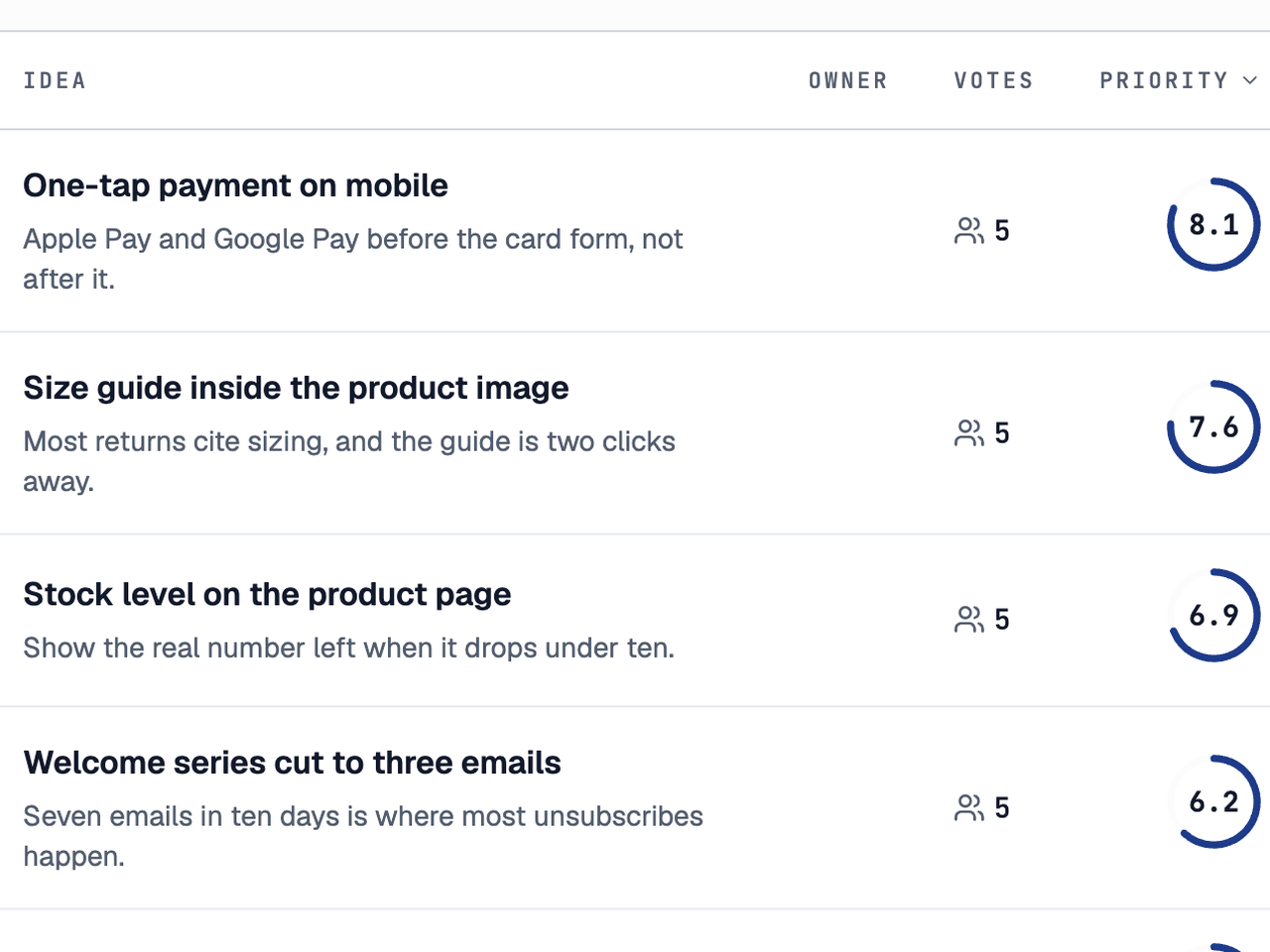
A backlog the team votes on
Score, funnel stage, and how many people voted.
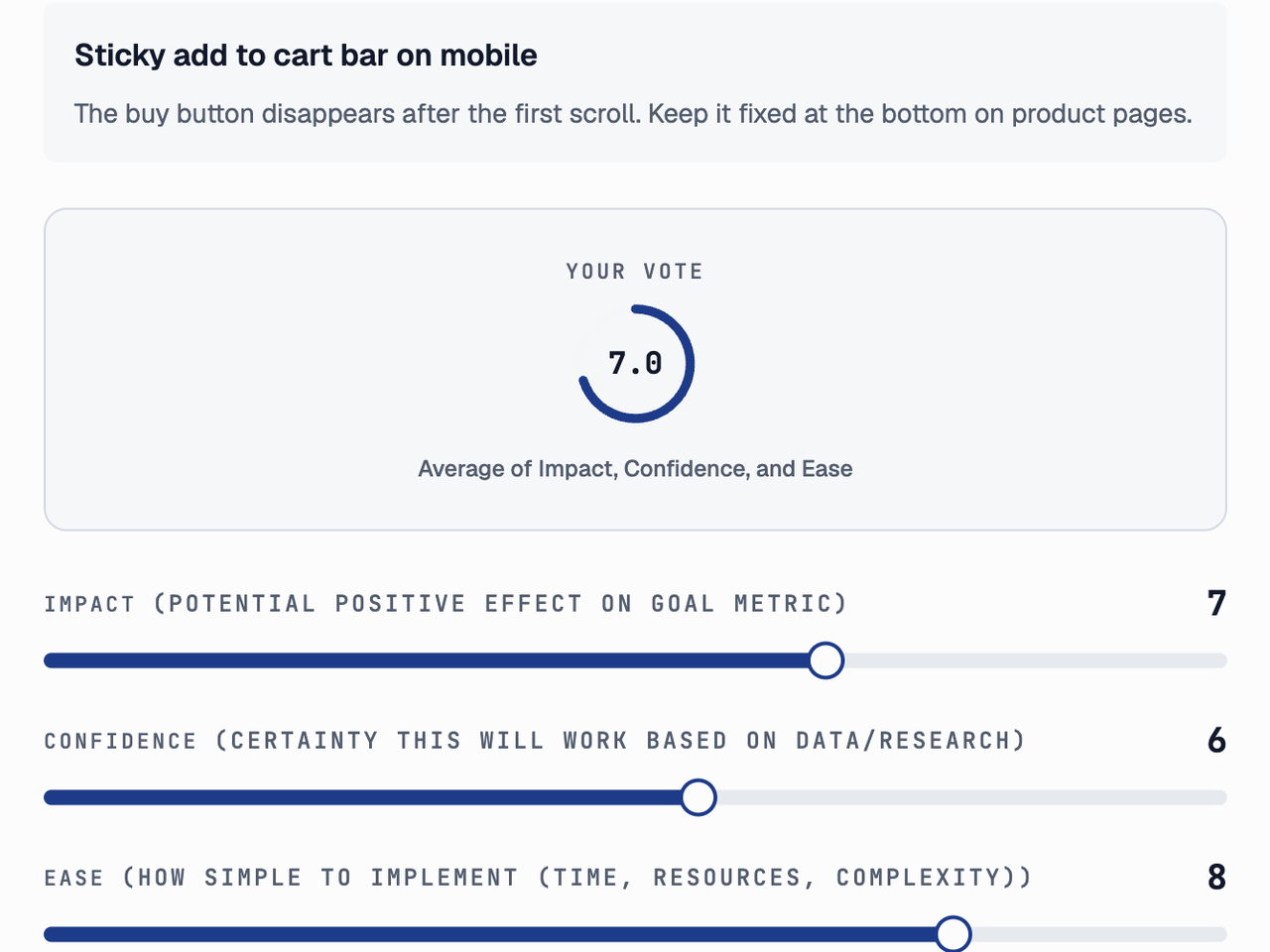
One vote per person
A slider for each dimension of the framework.
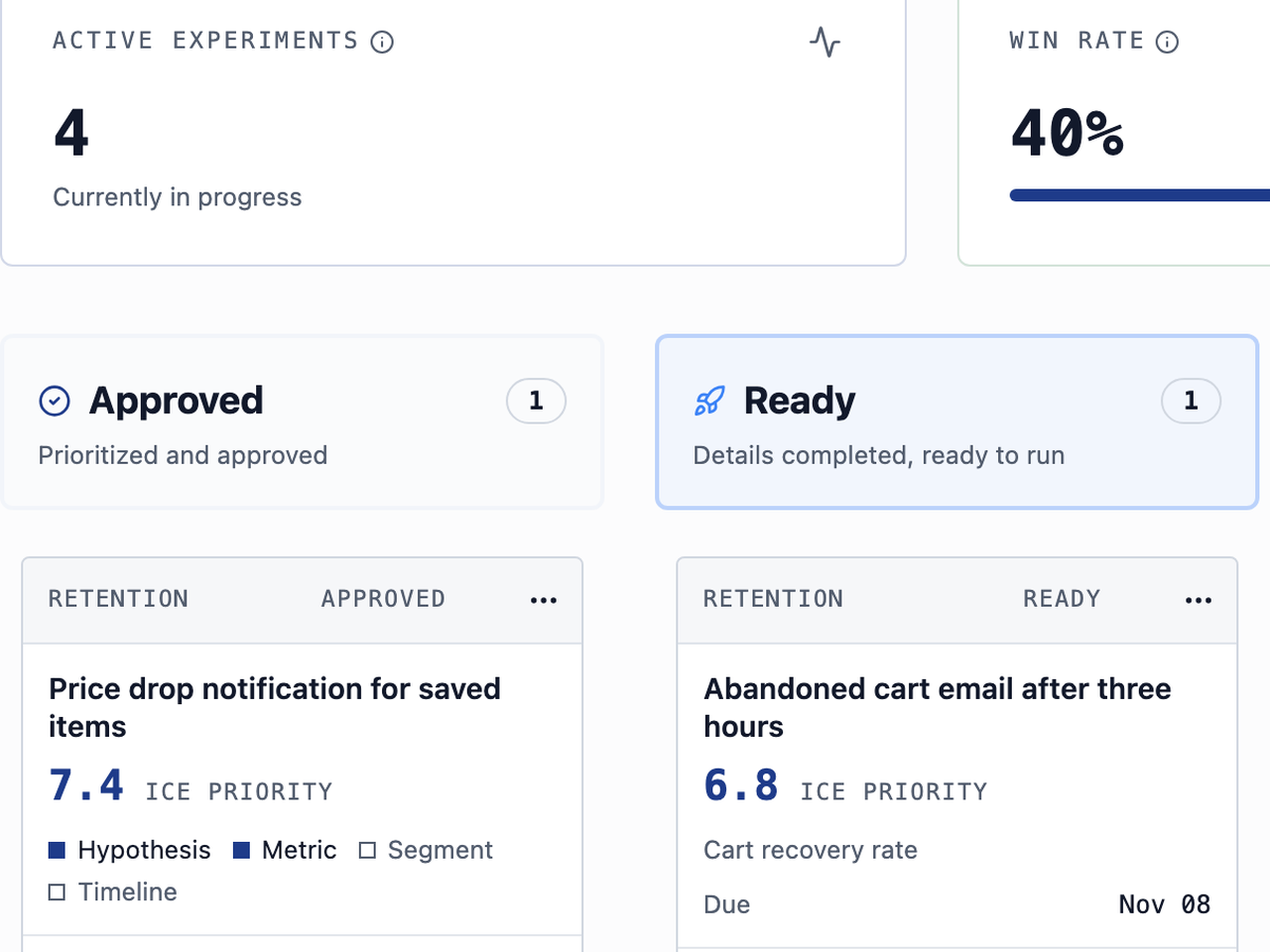
A pipeline with a gate
Ready only with hypothesis, metric, segment, and dates.
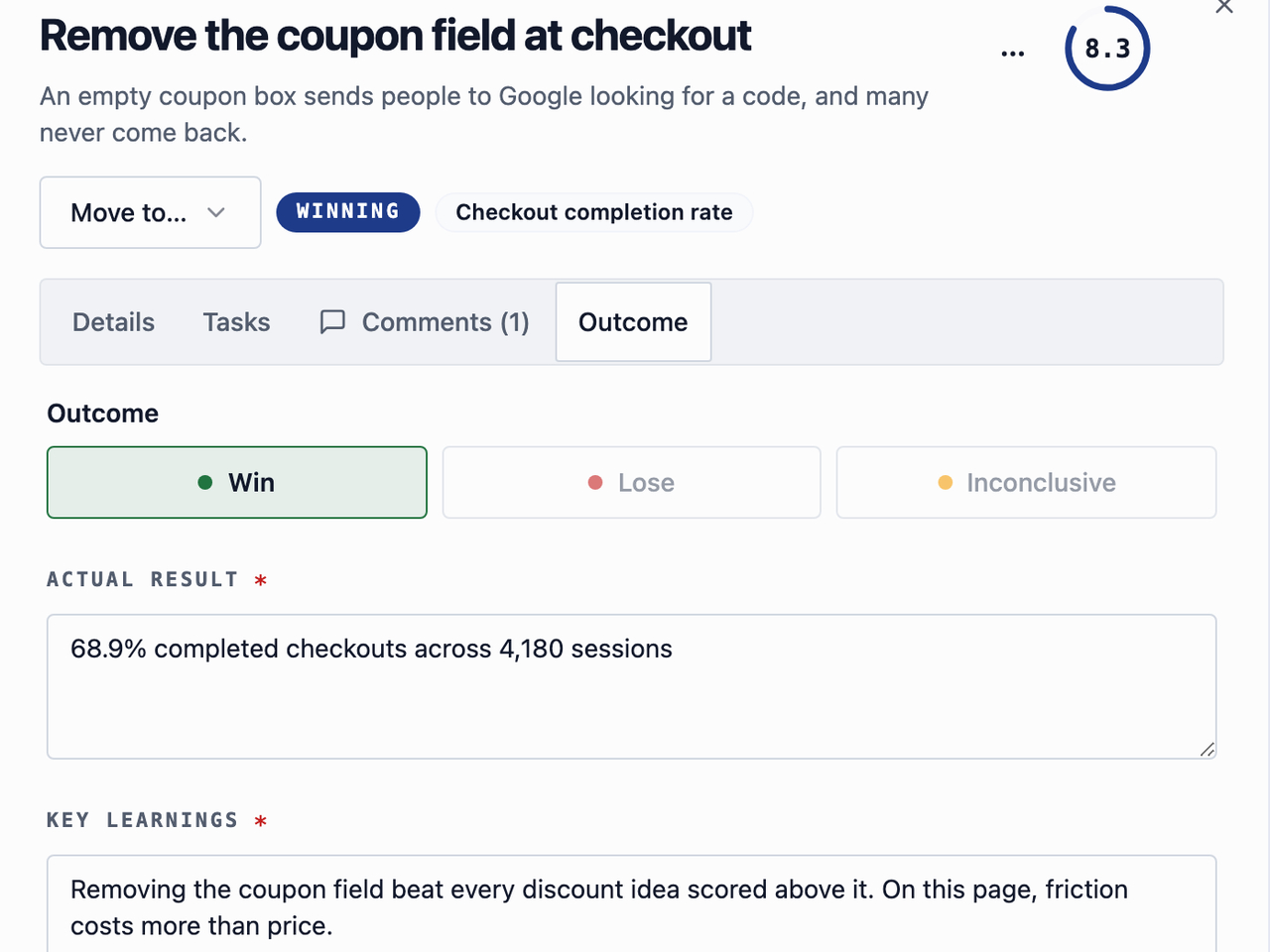
No close without a learning
Outcome, actual result, and learning, for people and agents.
“We test AI ideas daily, and the backlog was always the bottleneck. Now I brainstorm with Claude and the experiments land in Hypotize already scored and prioritized. The tool disappeared into the workflow, which is the best thing I can say about it.”
Data and control
Your data, and what your agent can do with it
- Where data lives
- Hetzner in Finland, inside the EU. Nightly backups, a restore tested every week.
- What the agent reaches
- Only what your account and role allow. Never billing or members.
- Deleting
- Off unless you grant the delete scope when you connect.
- Fixing a mistake
- Your team edits the idea, plan, result, and learning in the app.
- Switching it off
- Revoke the connection in the app; access stops at once.
- AI cost
- Hypotize runs no model. Your AI client's own plan applies.
Switching
Moving from Google Sheets or Excel in three steps
Step 1
Connect your agent
Add Hypotize to your MCP client, starting on the free plan.
Step 2
Hand it your Google Sheets or Excel tracker
Your agent reads a Google Sheet through Google's Sheets MCP server, or either file from a CSV or XLSX export. The import skill shows you its mapping and imports once you say yes.
Step 3
Keep the original until you have checked
Nothing is deleted in Google Sheets or Excel, so it stays your rollback while you review the import.
Method and sources
How this page was written
Reviewed 22 October 2026, from the official public pages listed below; no Google Sheets or Excel account was created. “Not in their docs” says only that those pages do not describe it. “They say it is not available” is used only when the vendor says so. Each row names the stronger side, in our judgment, or says “Only Hypotize documents it” when their pages are silent; there is no overall score.
The quotes under “What teams say” come from public Reddit threads, each linked to its comment and checked against the thread on 22 October 2026. They describe the authors' own trackers. No capability claim about Google Sheets or Excel rests on them.
“Agent-native” means Hypotize was built from the start for an outside AI agent and has no AI of its own. It runs the programme around the tests, not the tests: see Hypotize and A/B testing tools.
- Google: configure the Sheets MCP server
Developer preview; reads and writes cells, formulas, and rows with the user's permissions.
- Google: Gemini in Sheets
Formulas, tables, charts, and analysis inside the file on eligible plans.
- Google Sheets: dropdowns
Dropdown lists; off-list entries are rejected by default.
- Google Drive: share files
Viewer, commenter, and editor access for Sheets and other files.
- Google Workspace pricing
Per-user plans by country; Gemini in Sheets is not included in Business Starter.
- Microsoft: overview of Excel tables
Table columns, sorting, and filtering.
- Microsoft: apply data validation to cells
Validation lists and the Stop, Warning, and Important alerts.
- Microsoft: Excel co-authoring
Sharing requirements and editing at the same time.
- Microsoft Graph: working with Excel
Apps that read and change workbooks in OneDrive or SharePoint.
- Microsoft: Copilot in Excel
Insights, charts, and PivotTables inside the workbook.
- Microsoft 365 for the web
Free Excel with a Microsoft account.